Every device, vehicle, and piece of software you own has a unique fingerprint: its serial number. Whether you’re registering a warranty, reporting a theft, filing an insurance claim, or just trying to identify exactly which model you have, knowing how to find a serial number is one of those small skills that saves a lot of frustration.
The tricky part is that there’s no universal rulebook. A serial number on your washing machine isn’t hiding in the same place as one on your laptop, and a car’s serial number (technically called a VIN) follows its own format entirely. This guide breaks it down by category so you always know where to look first.
Electronics: Phones, Laptops, and Tablets
Electronics manufacturers usually print or etch the serial number directly onto the device, but they also bury it in the settings menu for easy digital access.
Smartphones (iPhone & Android):
- On the device itself: check the original packaging box, which almost always has a sticker listing the serial number, IMEI, and model number.
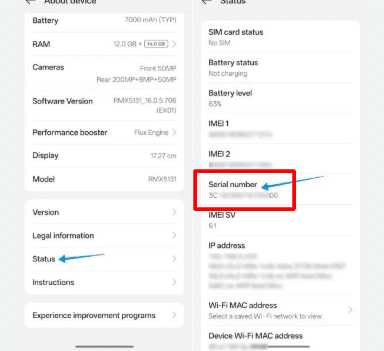
- In settings: on an iPhone, go to Settings > General > About. On most Android phones, it’s Settings > About Phone > Status (the exact path varies slightly by manufacturer).
- Physically: some phones have it printed on the SIM tray or, on older models, behind a removable back panel.
Laptops and Desktop Computers:
- Flip the laptop over — the serial number is typically on a sticker on the bottom panel.
- On Windows, open Command Prompt and type
wmic bios get serialnumber. - On a Mac, click the Apple logo > About This Mac, and the serial number is listed right on the overview screen.
Tablets and E-Readers:
- Check the back panel or the original box.
- In software, it’s usually under Settings > About Device.
Vehicles: Cars, Motorcycles, and More
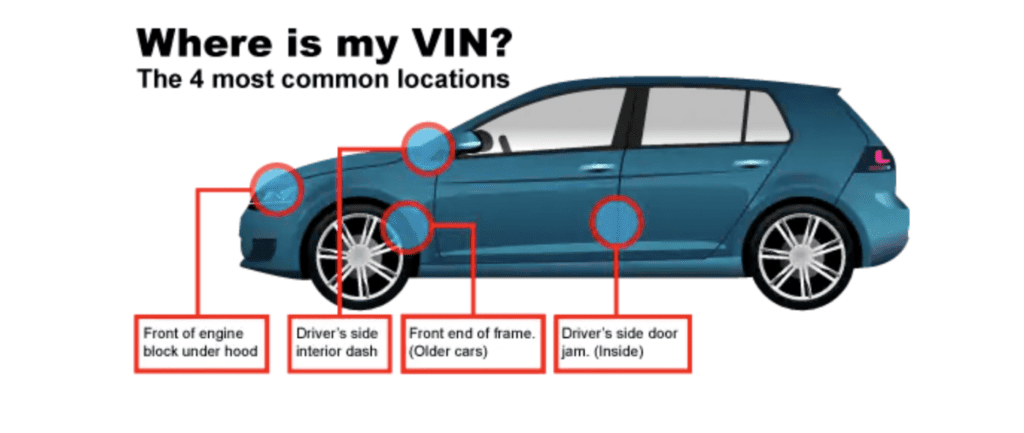
When people search for where a serial number is located on a vehicle, they’re really asking about the VIN (Vehicle Identification Number) — a 17-character code that functions as a car’s unique serial number.
Common places to find a VIN:
- Dashboard: Look through the windshield on the driver’s side where the dashboard meets the glass.
- Driver’s door: Open the door and check the sticker on the door jamb (where the door latches shut).
- Engine block: Many VINs are stamped directly into the engine bay.
- Vehicle documents: Your title, registration, and insurance card all list the VIN.
- Windshield (front): A small etched VIN sometimes appears in the lower corner of the windshield.
For motorcycles, the VIN is usually stamped on the steering neck or frame near the handlebars. For trailers and RVs, check the frame near the hitch or inside a storage compartment door.
Software: Licenses, Keys, and Product IDs
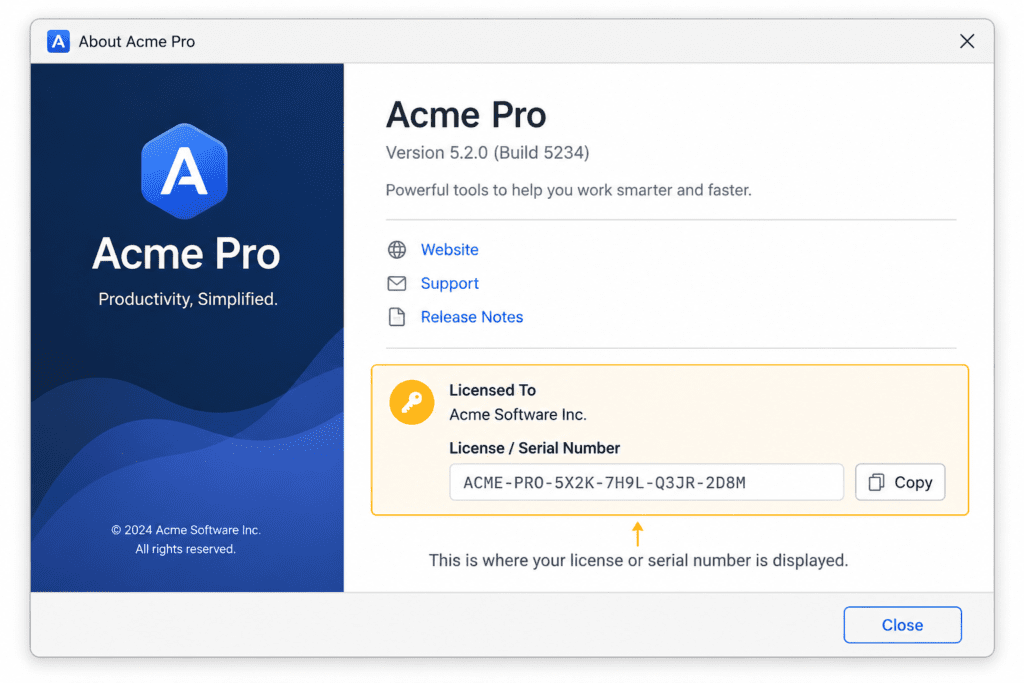
Software doesn’t have a “serial number” in the physical sense, but it has an equivalent: a product key, license key, or serial number used to activate the program.
Where to look:
- Purchase confirmation email: Most digital purchases (Microsoft Office, Adobe Creative Cloud, antivirus software) send the key directly to your inbox.
- Account dashboard: Many software companies store your license under “My Account” or “My Purchases” on their website.
- Inside the application: Go to Help > About within the software — many programs display the registered serial number there.
- Physical packaging: Older boxed software often had the key printed on a sticker inside the case or on a card.
- System registry (Windows): Tech-savvy users can sometimes retrieve a lost Windows product key through the registry or via a key-finder utility.
If you’ve lost a software key entirely, check your email archive first — search for the software name plus “license” or “order confirmation” — before assuming it’s gone for good.
Appliances: Refrigerators, Washers, and Ovens
Home appliances almost always keep their serial number on a metal or laminated sticker called a rating plate or data plate. The challenge is that manufacturers hide these plates in inconvenient spots to keep them out of sight.
Typical locations:
- Refrigerators: Inside the fridge compartment, on the side wall, or behind/under the crisper drawers.
- Washing machines: Inside the door frame, on the back panel, or behind the lid.
- Dryers: Inside the door frame or on the back of the unit.
- Ovens and stoves: Inside the oven door frame, or on the storage drawer underneath.
- Dishwashers: On the inner edge of the door, visible when the door is open.
If you can’t find it on the unit, check the original user manual or your purchase receipt — both often list the serial number for warranty purposes.

Tools: Power Tools and Equipment
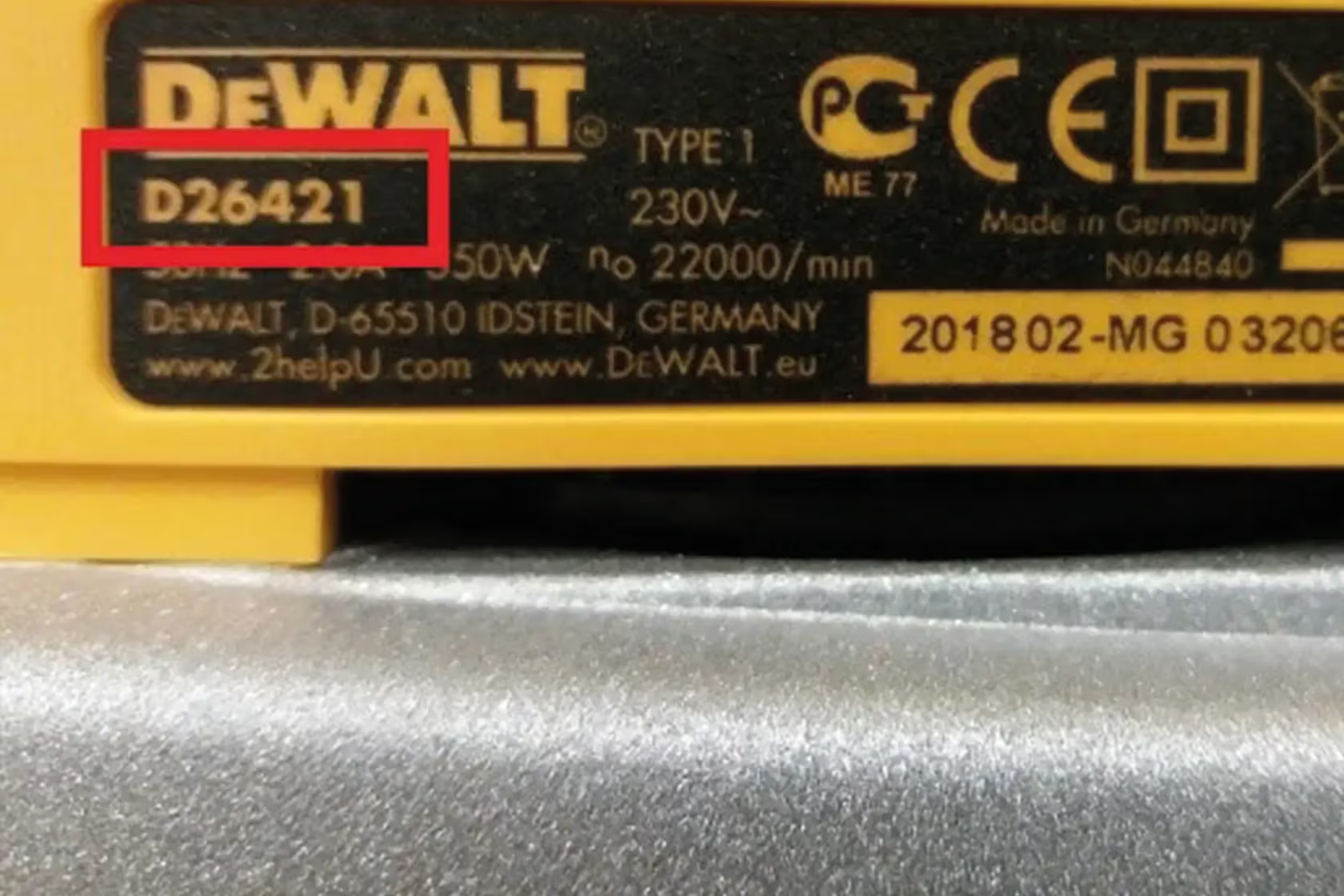
Power tools and outdoor equipment (drills, saws, mowers, generators) typically have their serial number stamped or printed directly onto the tool body, since there’s no “settings menu” to check.
Common spots:
- Base or housing: Look on the bottom or back of the tool body, near the motor housing.
- Battery compartment: For cordless tools, open the battery slot — the sticker is sometimes inside.
- Handle or shaft: Long-handled tools (string trimmers, pressure washers) often have it stamped into the metal shaft near the engine.
- Manufacturer’s nameplate: Most gas-powered equipment has a small metal nameplate riveted to the frame, listing the model and serial number together.
This information matters for tools especially when registering a warranty or reporting equipment stolen, since insurers and police reports require the exact serial number to track recovered property.
Quick Reference: General Tips for Finding Any Serial Number
If you’re still stuck, these general strategies work across almost every product category:
- Check the original box or packaging — manufacturers print serial numbers on shipping labels far more often than people realize.
- Look for a metal or laminated plate — these resist wear better than paper stickers and are the manufacturer’s “permanent” record.
- Search your email for the order confirmation — most receipts list the serial number, especially for big-ticket purchases.
- Check the manufacturer’s app or website — many brands let you register a product and pull up its serial number if you’re logged into your account.
- Use the manual — printed manuals often have a dedicated spot on the cover or first page to write down the serial number at purchase.
Final Thoughts
Knowing where the serial number is located on your phone, car, software, appliance, or tool isn’t just a fun fact — it’s practical knowledge you’ll need for warranty claims, theft reports, resale listings, and tech support calls. Bookmark this guide, and the next time someone asks “where do I even look?”, you’ll have the answer in seconds.